
A. Customer Service Rep persona
We started by getting a good understanding of the customer service representatives' roles and responsibilities. We created an explicit callout highlighting some of the pain points from his perspective. We then mapped all these details in the persona, as shown on the right.

B. The CSR journey
-
We took our findings and deep dived into each task for the CSR.
-
We created a persona named Scott McMiller and filled in all relevant details.
-
Using the persona, we built a detailed task flow that provided a clear picture of the features to include in the interface.
Here's some quick context on this case study.
Here's some quick context on this case study.
Ticket managment
Here's some quick context on this case study.
01
Objective:
-
Our team was asked to come up with a Quest Proof of Concept (PoC) where the goal would be to devise a Fleet Management application addressing the use case of a STAT order fulfillment that would allow the Customer Service Representatives (CSRs) to:
-
Manage master data for Customers, Routes, Labs, Fleets, and Drivers
-
Assign/Scheduled routes as changes dictate
-
Receive and update customer information (on demand)
-
Ensure smooth data flow/integration
02
User Segments:
-
The Customer Service Representative (CSR) receives tickets and assigns drivers based on their availability and proximity to the origin and destination.
-
The Drivers are notified of the pending dispatch and can accept or decline it.
03
Challenges Addressed:
-
Getting a key understanding of the CSR roles and responsibilities, and their journey in assigning tickets
-
Building an interface for drivers, managing their orders, and creating scenarios for real-time updates
04
Process:
-
The Customer Service Representative (CSR) receives tickets and assigns drivers based on their availability and proximity to the origin and destination.
-
The Drivers are notified of the pending dispatch and can accept or decline it.
05
Design Considerations:
-
Keeping Quest’s branding and creating a robust, detailed flow
-
Adding components like maps to showcase wayfinding was particularly challenging, but completely necessary
06
Outcome & Impact:
-
Showcasing a seamless experience with Quest for diagnostic samples
-
Winning the pitch and gaining the business

C. The driver journey
-
While the driver’s journey is more straightforward, he is a key part in picking up the samples and delivering them.
-
The driver also provides real-time feedback, which is critical to the CSR in estimating deliveries, so this is a feature that needs to be shown upfront.
Order fulfillment
A critical and final phase in delivering anything.
Who delivers it? Who decides. This case study unravels all.


1. Main Dash
-
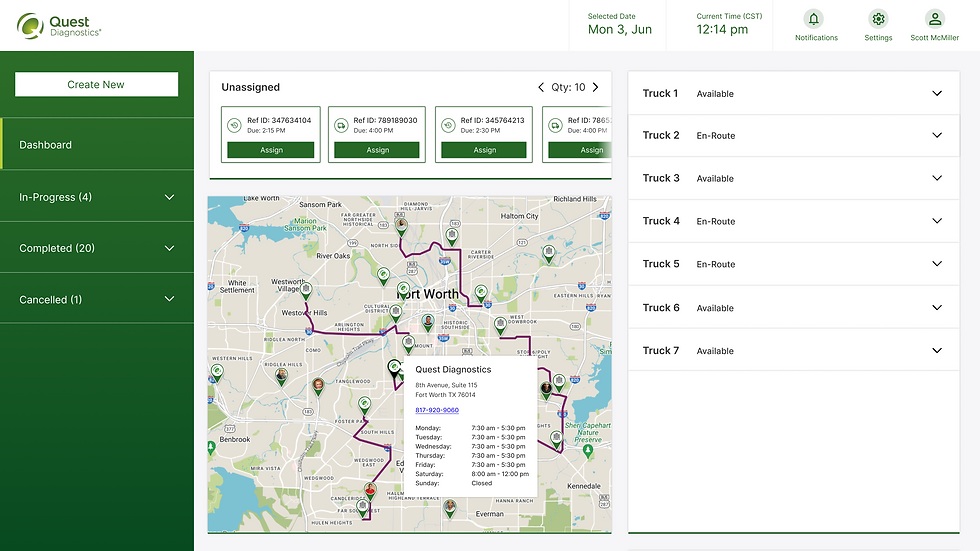
In this interface, the CSR gets a dashboard overview of all their available tickets and drivers.
-
In the top corner of the dashboard, he can see all open tickets and match them to drivers.
-
The right panel displays a list of available trucks.

2. Modal
-
When he clicks the ticket at the top, a modal opens with all the relevant details for the order.
-
The modal also shows a map, the available drivers, and the driver's suggested routes.
-
Once a driver and route are selected, he can notify the driver to fulfill the order.

3. STAT pending acceptence
-
Since the ticket is now assigned to the driver, it is moved to the in-progress stage.
-
Here, the CSR has all the details pertinent to the ticket and can even access the chatbot to communicate with the driver.

4. Main dash ticket accepted
-
Since the ticket is assigned and waiting on driver confirmation, the CSR navigates back to the dashboard to assign other tickets.
-
He then receives a notification that the earlier ticket has been accepted by the driver Russel Gilbert, which is displayed as a pop-up on the left side of the screen.

5. STAT delay chat
-
The CSR can then navigate back and forth between the dashboard and the in-progress sections of the interface.
-
Here, he can track the order in real time and receive updates on any delays.
-
For instance, Russel has informed Scott of the traffic situation, but has said he will still make the drop within the window.
6. Central Dash
-
As the CSR navigates back to the dashboard to monitor other drivers' activities, he receives a notification that Russel has delivered the sample.

7. Ticket closed
With the sample now delivered, the CSR can review all the details of the drop-off, the driver route, and the overall time taken and close out the ticket.
Parting thoughts
01
This Proof of Concept demonstrated how a well-designed fleet and ticket management system can transform the STAT order fulfillment experience for Quest Diagnostics.
02
By understanding both CSR and driver workflows, we created a solution that centralizes information, improves communication, and enables real-time decision-making.
03
Despite the challenging 3-day sprint, the team delivered a clear, intuitive, and branded design that impressed stakeholders—ultimately securing the partnership and validating the power of thoughtful UX in high-stakes, time-sensitive operations.
A reasonable conclusion of why this interface makes sense.
A reasonable conclusion of why this interface makes sense.
Project Dynamics
Team
Three/3 designers- I worked on several features, but am showcasing this particular feature.
Client
Quest Diagnostics
Timeline
Two weeks: 2 weeks
This case study is, after all, for a Proof of Concept!